Markbeam: an online Markdown editor with live preview
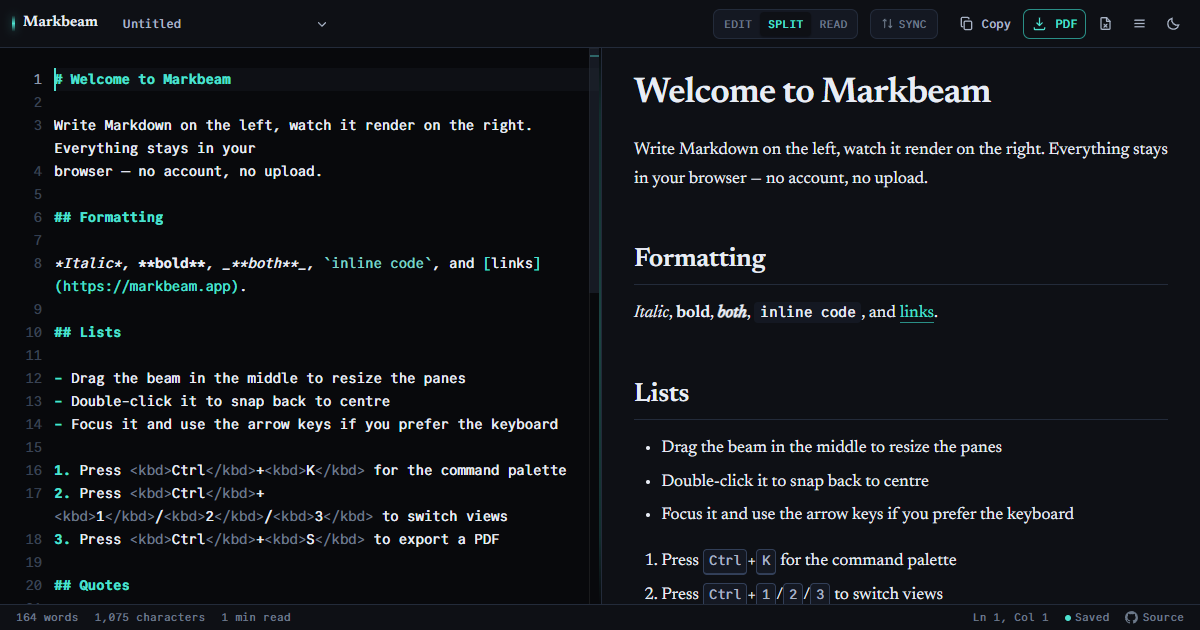
Write Markdown on the left and watch it render on the right. No account, no waiting — your documents are stored in your own browser and stay there unless you connect them to a GitHub or GitLab repository yourself.
What it supports
- GitHub-Flavored Markdown — tables, task lists, footnotes, strikethrough and bare autolinks, with a CommonMark mode when you need the stricter parser.
- Mermaid diagrams — flowcharts, sequence diagrams and the rest, rendered from fenced code blocks as you type.
- LaTeX math — inline and display formulas via KaTeX.
- GitHub-style callouts — Note, Tip, Important, Warning and Caution blockquotes.
==highlight==and:emoji:shortcodes.- Definition lists — a term on one line,
: its
            definition
on the next, from Markdown Extra. [TOC]— a contents list built from your headings, with links that work in the preview, the PDF, the HTML file and the Word export.- Typographic punctuation — curly quotes, en dashes and ellipses, off until you switch it on, because it rewrites what you typed.
- Local images — paste or drop PNG, JPEG and WebP files. Large images are resized in your browser and embedded directly in the Markdown; they are never uploaded.
- Table editing — with the cursor in a table, add or remove rows and columns and cycle a column's alignment; the source is rewritten aligned, and a cell containing a pipe stays escaped.
- Several documents — grouped into folders, searchable across all of them at once, with an autosave history per document and a seven-day trash for the ones you delete.
- Editing a file on disk — in Chrome and Edge, open a
.mdfrom a folder and save straight back to that file, instead of copying in and copying out. If it changed underneath you, Markbeam never overwrites it: both versions are kept and you choose. Browsers without the API are offered nothing that cannot work and keep the drop-and-download route. - The editing around the writing — a formatting toolbar, find and
replace, an outline for jumping between headings, three view modes on
Ctrl+1/2/3with a draggable divider, scroll that keeps both panes together, and a command palette onCtrl+Kholding all of it.
Getting the document out again
One Export button in the toolbar holds six of these — PDF, slides as PDF, an HTML file, rendered HTML on the clipboard, Word and Markdown — so none of them is reachable only by knowing a shortcut. Printing and share links are in the command palette.
- PDF — paginated so headings, tables, code blocks and diagrams are not sliced across a page break.
- Print — the document, not the application: no toolbar, no editor pane, and always on a light background whatever theme you use.
- HTML — a standalone file with its styles inlined, or copied to the clipboard with table borders intact so it survives a paste into an email.
- Word (
.doc) and the original Markdown source. - Shareable links — the document is compressed into the URL fragment, so it never touches a server.
- Slides — three dashes on their own line separate them. Present full-screen with the arrow keys, or export the deck as a PDF with one landscape page per slide.
- Custom preview CSS — your own stylesheet, scoped to the preview and carried into the HTML and Word exports. The PDF ignores it deliberately: that export rasterises the page, and CSS its renderer cannot read would produce a blank document rather than an error.
- GitHub and GitLab — save the open document to a repository you name, or open one from it, with a scoped token you supply. You can also publish to a secret or public Gist. Saving and opening are manual; automatic sync exists and is off until you switch it on, as described below.
Reading a Markdown file
Markbeam is a viewer as well as an editor: drop a .md file anywhere on
the window — or pick one from the command palette — and it renders immediately, with
no upload step. Ctrl+3 hides the editor and gives the
rendered document the whole window, which is the closest thing here to a plain reader.
There are longer walkthroughs of the four things people most often arrive wanting:
opening and reading a .md file,
exporting Markdown to PDF,
Mermaid diagrams, and
presenting a document as slides.
Your documents stay yours
Everything is held in your browser's local storage. There is no account, no third-party font CDN and no server that sees what you write. There is no analytics tag either — nothing counts your visits, identifies you, or sets a cookie. The one measurement Markbeam does take is page speed: how quickly the editor became usable, reported without anything about you or your document, from this domain rather than a third party. Pasted and dropped images are processed and stored there too. Several documents can be kept side by side, autosave history keeps earlier versions of each one, and a deleted document goes to a trash that holds it — with its history — for seven days, so an accidental deletion is recoverable rather than final.
The one exception is a repository you connect yourself. Saving and opening are manual: each one happens because you just asked for it. If you also switch on automatic sync, a document you have already saved to a repository is sent again when you stop typing — only that document, only after a change, and never one you have not saved there yourself. It is off until you turn it on, and turning it off stops it immediately.
Markbeam never merges. If the file changed in the repository since you last wrote it, your version and theirs are both kept as separate documents and you choose — nothing is overwritten on either side.
The token you supply is kept only until the tab closes, unless you tick remember on this device. It is sent as an authorisation header and never in a web address, so it stays out of your browser history and out of anyone's logs.
Open source
Markbeam is AGPL-3.0, and the whole of it is readable — the Source link in the status bar goes straight to the code. That link is not a courtesy: the licence obliges anyone running a modified Markbeam as a service to offer their own users the source of their version, and a link in the interface is how that obligation is met. So every claim on this page is one you can check against the code rather than take on trust.
Questions people actually ask
Is it free?
Yes, and there is nothing to sign up for.
Does it work offline?
Yes, after the first visit. A service worker keeps what you have already loaded, so once the page has opened once with a connection it will open again without one, with your documents intact — and it can be installed as an app, in its own window. Markbeam offers that once you have actually used it rather than on arrival, takes “not now” for an answer, and the offer is always in the command palette if you change your mind.
What it does not do is fetch things you have never used. Syntax highlighting for a language you have not opened before, or PDF export if you have never exported, both need one online run first. That is a property of caching on use rather than downloading several megabytes on the off chance.
Do you track me?
No. There is no analytics tag, no cookie, no visitor identifier and no record of what you write — the documents never leave your browser to begin with. Markbeam does collect anonymous speed measurements: how long the page took to become usable, and how much it shifted while loading. Those are timings, not visits, they carry nothing that identifies you, and they are sent to this domain rather than to anyone else. Watch the network panel if you would rather check than take our word.
Can I use it on a phone?
Yes. Below roughly 900 pixels the two panes become tabs, so you switch between writing and reading rather than splitting a narrow screen.
Start writing →